How to Choose the Best Blog Topics

Michael Weitzman • August 6, 2013

If you maintain a business blog, you have probably spent time pondering what topic would be worthwhile to address in the next blog post. The very best business blog topics do two things: reach your target audience and enhance your website’s SEO in the process. Luckily there are some proven strategies for selecting exactly the type of topics that can help you achieve your goals.

Consider Your Audience

First of all, you can find inspiration if you consider the type of posts that engage most readers:

  • Topics related to your clients’ biggest problems are often the most popular. One approach to engage your audience and find topics at the same time is to send a query to your email marketing list to get feedback on their top questions, concerns, and problems. Surveying your clients by email is a sure way to make sure your posts are of interest to at least some of your audience, to get potential clients to visit your blog, and to start a conversation that some of your clients are likely to engage in.

  • Readers are likely to read content that seems relevant to them at the moment. Make your blog relevant by relating your business or expertise to current events and news stories, or events of local interest. Choose a local article to reference or review.

  • Check your blog metrics to see which of your previous posts were most viewed, and then come up with topics related to your most viewed previous posts (assuming that is the audience you want). There are two reasons to do this. One reason is that your audience responded to something within the previous posts. Continue the conversation and keep them coming back for more! The other reason is that blogging on a topic similar to your previous post can improve your page rank. Link to the previous related post, which will also give you a backlink to improve your SEO.


Optimize for Keywords

Speaking of SEO, another way to choose topics is to focus on keywords to improve SEO.

  • One source of great topics is Google Analytics, the free tool that you can run on your website to see (among other things) what keyword phrases bring readers to your site. Check your Google Analytics for 3 and 4 word keywords used to find your site with longer page view time. Once you review your analytics, you can come up with a new topic incorporating those keywords.

  • Another option is to make your blog post titles reflect the keywords for which you want to be found. You can probably come up with these terms on your own, or you can search Google AdWords Keyword Tool to get ideas for keywords related to your blog. There are also free keyword list generators that can give you ideas.

  • Be sure to think about long tail keywords, the longer keyword phrases that are more specific and targeted than “head” (or shorter) keywords. Long tail keywords drive most search engine traffic.

There are many ways to find potential topics to keep your blog fresh and useful, but these are a few tried-and-true strategies to give you a starting point next time you are searching for effective topics. Any time you would like help maximizing the marketing potential of your blog, be sure to contact the experts at World Source Tech.

Photo: Bright Meadow
By WST Support Team March 20, 2026
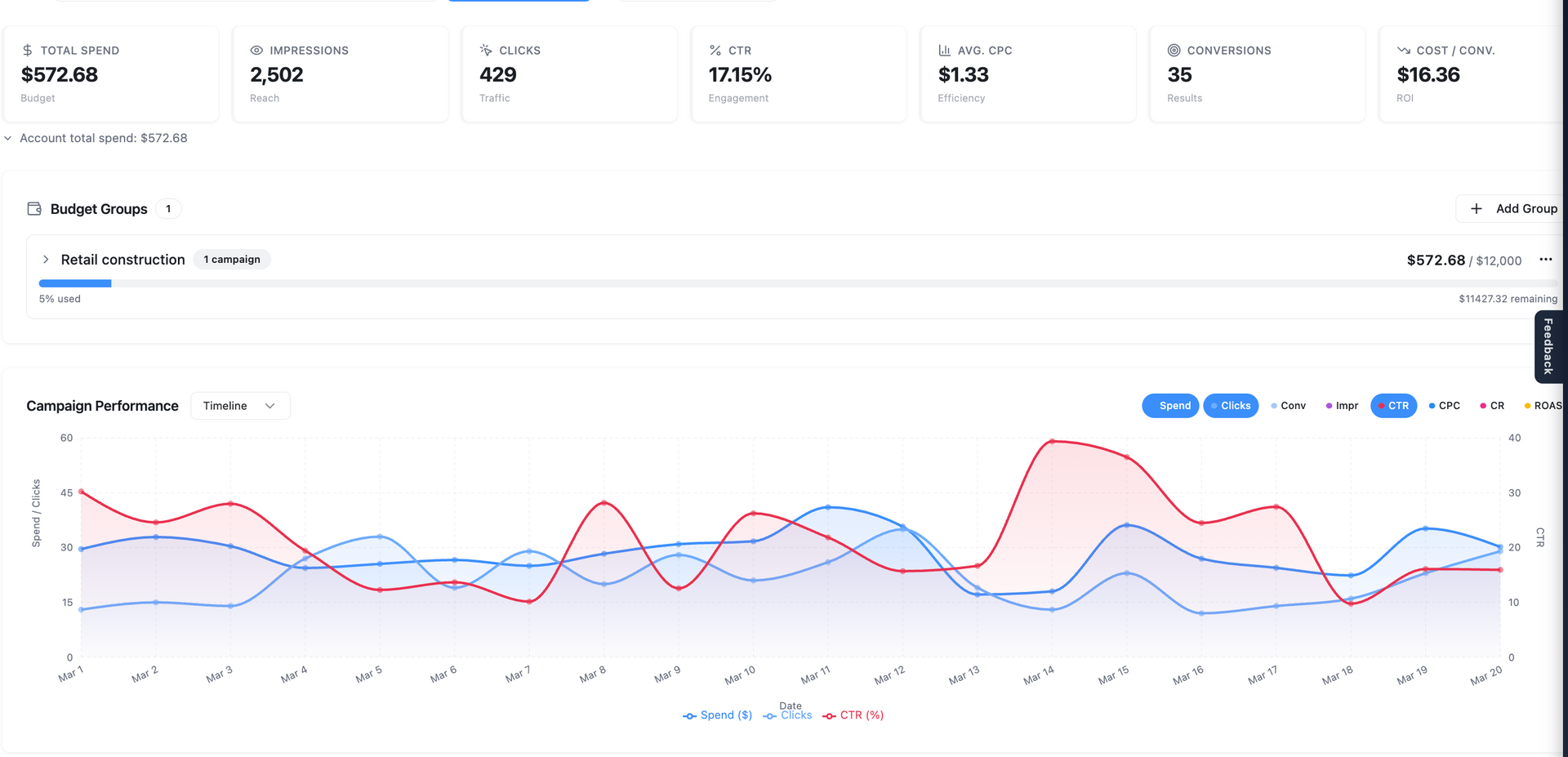
Marketing Center: Your Complete Command Center for Campaign Performance The Marketing Center inside Central is where strategy, performance, and collaboration come together. Designed for both clarity and depth, it gives you full visibility into your marketing efforts—while making it easy to analyze data, collaborate with your team, and make smarter decisions faster. Whether you’re reviewing performance at a high level or diving into granular details, everything you need lives here. A Unified Overview of Your Marketing Performance When you enter the Marketing Center, you’ll land on the Overview page . This is your starting point—a clean, consolidated snapshot of all campaigns managed by World Source Tech. Here, you can quickly: Understand overall performance across accounts Identify trends and momentum Get a sense of where things stand without digging into reports It’s designed to answer one simple question instantly: “How are we doing?” Campaign-Level Visibility and Control From the Overview, the Campaigns tab allows you to go deeper. You’ll see performance broken down by individual campaigns, giving you a clearer picture of: Which campaigns are driving results Where optimizations may be needed How performance changes over time You can also adjust date ranges on the fly—whether you want to analyze last month, compare time periods, or review a custom range. This flexibility allows you to move beyond static reporting and into real analysis. Audience & Targeting Insights: Understanding the “Why” Data becomes significantly more valuable when you understand the story behind it. Inside Audience & Targeting Insights , you can explore: Demographics – Who your audience is Locations – Where your engagement is coming from Devices – How users are interacting with your campaigns Keywords – What people are searching for and responding to These insights help you move from surface-level metrics to strategic understanding. Even more powerful—this data can be viewed at multiple levels: Account-wide Campaign Ad group Individual ad This allows you to pinpoint exactly where performance is being driven—or lost. Ad-Level Insights and Real-Time Collaboration The Ads section gives you a detailed look at your creative performance. You can: View live previews of your ads Cycle through variations Review asset-level performance (such as headline effectiveness) But what truly sets this apart is built-in collaboration. You can highlight any part of an ad—like a headline or description—and leave a comment directly in context. Ask questions Suggest changes Tag your account team using “@” This eliminates long email threads and keeps communication exactly where it matters—next to the data and creative itself. Full Keyword Transparency Inside the Keywords tab , you’ll find complete visibility into: Active keywords driving traffic Negative keywords filtering out unwanted searches This ensures you understand not just what’s working—but also what’s being intentionally excluded to improve efficiency and performance. Revenue Tracking and ROI Insights The Revenue Tracker allows you to connect actual business outcomes to your campaigns. You can input revenue data tied to your marketing efforts, enabling: More accurate performance analysis Deeper insights into return on ad spend (ROAS) Better alignment between marketing activity and business results All inputs are flexible—so you can provide as much or as little data as you have available. Google Analytics Integration When connected, the Google Analytics section adds another layer of visibility. You’ll be able to view: User behavior Traffic patterns On-site engagement This helps bridge the gap between ad performance and what happens after the click. Smarter Reporting with Business Context Inside the Analysis tab , reporting becomes more intelligent. By adding Business Context —your goals, priorities, and key business details—you enable more meaningful and tailored performance insights. This ensures that analysis isn’t just data-driven—it’s business-driven . Your account manager will typically configure this, but it can be updated anytime to reflect evolving priorities. Research & Strategic Planning Tools The Research tab is designed to support campaign planning and expansion. You can generate insights into: Target audiences Psychographics Market dynamics Competitive landscape From there, key findings can be saved and organized for future use. This turns the Marketing Center into not just a reporting tool—but a strategy engine . Visual Planning with Boards The Boards feature provides a flexible, visual workspace for organizing ideas and strategy. You can: Map out campaign concepts Save research insights Upload and organize creative assets It’s a collaborative environment where strategy and execution come together. Competitive Intelligence The Ad Intelligence section gives you visibility into how competitors are advertising. This helps you: Identify trends in your industry Understand competitive positioning Discover new opportunities Access to this feature may vary based on your plan, but it’s a powerful addition for staying ahead. Built for Clarity, Speed, and Collaboration The Marketing Center was designed with one goal in mind: To give you complete clarity and control over your marketing performance—without complexity. It combines: Real-time data Deep insights Seamless collaboration Strategic planning tools All in one place. A Better Way to Manage Marketing With the Marketing Center, you’re no longer waiting for reports or piecing together information from multiple platforms. Everything is accessible, organized, and actionable—right when you need it. Clarity. Insight. Collaboration. This is the new standard for marketing performance.
By WST Support Team March 20, 2026
Introducing Central: The Future of Project Management at World Source Tech  At World Source Tech, we’re always looking for ways to improve how our clients experience project management, communication, and account visibility. Today, we’re excited to officially announce the transition from Hub to our new and significantly enhanced platform: Central .
August 1, 2025
How to manage orders in WST Native Store
By WST Support Team April 25, 2025
By WST Support Team December 1, 2024
a woman in a blue jacket is holding a tablet in a server room .
By Michael Weitzman March 4, 2024
Faster load times could increase lead gen.
Show More