How To Get Real Estate Leads Online

Michael Weitzman • July 29, 2019

10 things you can start doing today to get more real estate leads from your online presence

happy real estate agent with website leads

Generating qualified leads is what many top producing real estate agents are challenged with today. Instead of paying out for people’s contact details, you need to drive traffic to your website and enhance your organic search engine results. You want people who are serious about buying, so it’s not just about persuading everybody to click on your site. It’s all about the quality of your leads, which can be easily achieved using tried and tested methods. So make a worthwhile return on your investment and maximize your results using some of the following simple techniques.


1.MLS Listing


Advertising on a multiple listing service is fundamental to capturing leads from your website. Sometimes having MLS listings fed to your site can be costly, however you might be able to link to a major real estate company, in which case listings can be free of charge. Generally, you will simply need a HTML code that is inserted in the website, so it points people in the right direction for information. If you are able to turn on lead capture for leads searching MLS listings on your website that’s a great first step. Similarly, you should also ensure your website integrates with the local MLS if possible.


2. Customized Meta Data


If you want people to click onto your website, you need a carefully thought out meta description. This small block of text will appear beneath your title in search engine results and needs to catch the eye of the user. In around 200 characters you need to persuade people to click on your link, so think carefully about what to include. Use active language to encourage the reader to click through and make sure you use a couple of your thoroughly researched keywords. Creating your own custom meta descriptions is a great way to control the information that is being displayed on search engines.


3. Include Useful Tools


When it comes to capturing real estate leads, you need to include useful tools that appeal to prospective buyers. Calculators, maps and check lists make a visual impact on potential leads and are persuasive tools for your website. Don’t forget to include high quality photos too, along with very detailed information about the property in question. Interactive maps are also very useful as it gives leads an insight into neighborhoods, schools and local attractions.


4. Blog, Blog and Blog Some More


The power of blogging should never be underestimated. When you create innovative content that hits the relevant keywords, your website will climb up the rankings on search engines. For optimum real estate lead generation, you should aim for up to sixteen blog posts a week. Think about hiring guest bloggers in order to keep the content flowing and make sure you keep posting as consistent as possible.


5. Use Facebook and Google Ads


Facebook and Google Ads are invaluable tools that can be used to appeal to specific audiences you are targets. In order to differentiate your PPC ads from others you need to hone in on your unique selling point. Think about what make your company different. Do you specialize in certain type of property? Are your office opening hours particularly flexible? Hold onto those key traits and use this in you ads to grab the readers’ attention.


6. Audit Your SEO


When it comes to real estate SEO, you need to be constantly auditing and improving it. Use Google’s AdWords Keyword Planner to make sure your keywords are always as relevant as possible. Don’t forget the importance of geographic modifiers to your keyword terms too, as this will attract high quality leads. Narrowly focusing your keywords using specific neighborhoods, housing types or even school districts will dramatically improve your SEO. Similarly, SEO can also be affected by your website loading times and labels on your pictures and videos. Carry out a thorough audit right now and see where you could make improvements.


7. Get Savvy With Social Media


As well as your real estate website, you need to focus on social media platforms too. When you take the time to understand and utilize social media effectively, your leads will dramatically increase. Nowadays, businesses don’t operate to their full potential without social media; it is the single most important advertising tool you can have. With very little effort you can have a multitude of platforms to promote your real estate business. What’s even more impressive is that you can use social media scheduling tools so that your posts go out automatically. All you need to do is spend a little time each week scheduling your posts and they will be uploaded to the relevant platforms at the right time of day that is specified by you.


8. Create a Desirable End Picture for Prospects


By laying out your website in a logical manner, it literally guides your prospects through each stage. When navigation is unclear and the customer journey is overlooked it can create confusion and it causes the lead to give up quickly. You want to encourage your lead to take action and take the next step in the sales funnel. This can be achieved by creating a desirable end picture for your potential clients using emotive and active language. Tap into the way they might be feeling when searching for a home and relate to them on another level. Partner this will plenty of calls to action and they will glide through your website smoothly and seamlessly.


Take Action Now


If you can incorporate these techniques right now you will be able to attract more qualified online visitors to your website. Your online platform will soon become a go to resource that prospective home buyers resort to every single day. In truth, every real estate business will be intriguing to somebody; it doesn’t matter what type of company you are running. Your goal is to find that niche group of people who will be attracted to your business. By creating content that is specific to your audience demographic, your website will appeal to the right people. This, in turn, will help increase your real estate leads from your online platform.

By WST Support Team March 20, 2026
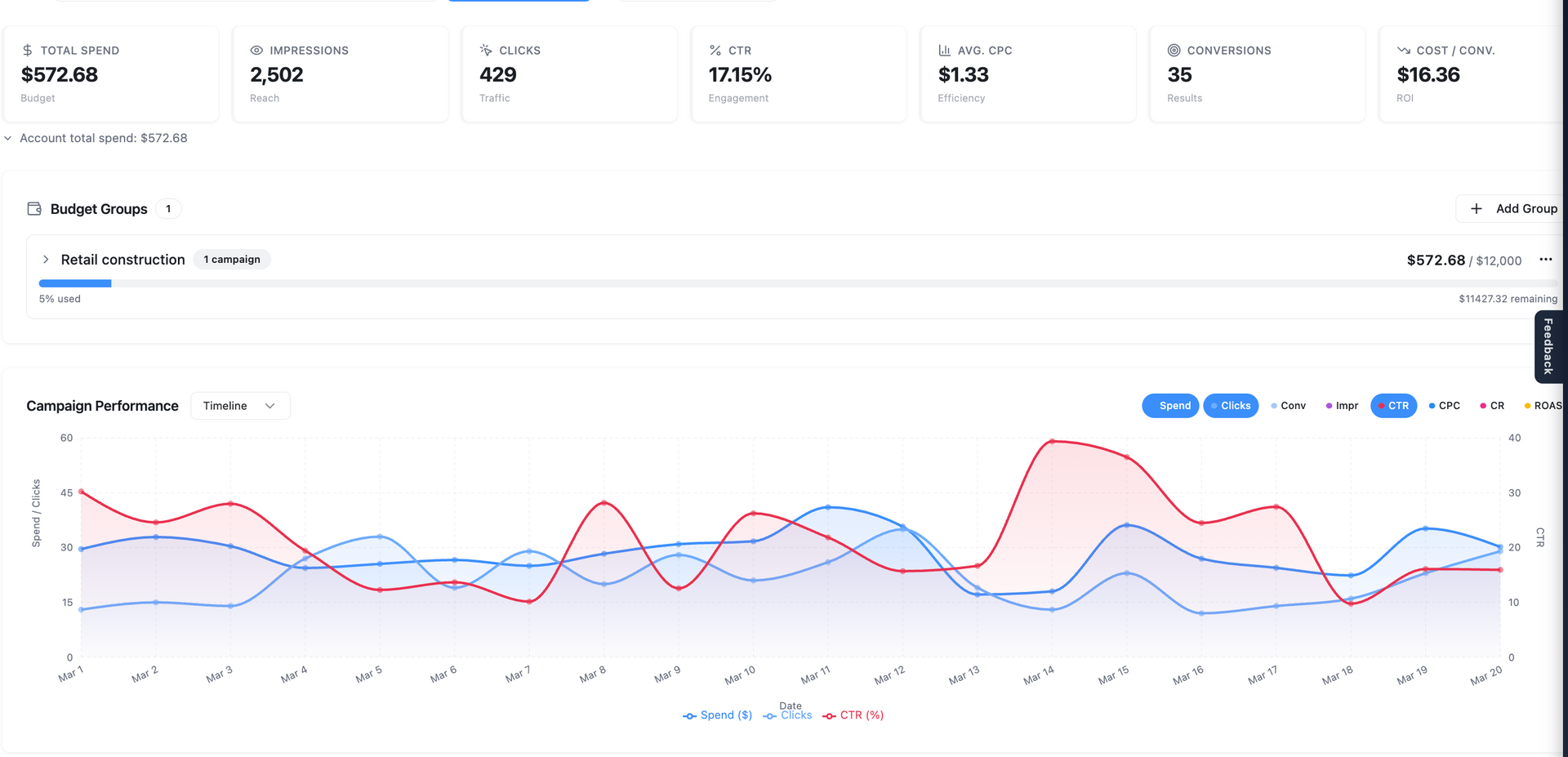
Marketing Center: Your Complete Command Center for Campaign Performance The Marketing Center inside Central is where strategy, performance, and collaboration come together. Designed for both clarity and depth, it gives you full visibility into your marketing efforts—while making it easy to analyze data, collaborate with your team, and make smarter decisions faster. Whether you’re reviewing performance at a high level or diving into granular details, everything you need lives here. A Unified Overview of Your Marketing Performance When you enter the Marketing Center, you’ll land on the Overview page . This is your starting point—a clean, consolidated snapshot of all campaigns managed by World Source Tech. Here, you can quickly: Understand overall performance across accounts Identify trends and momentum Get a sense of where things stand without digging into reports It’s designed to answer one simple question instantly: “How are we doing?” Campaign-Level Visibility and Control From the Overview, the Campaigns tab allows you to go deeper. You’ll see performance broken down by individual campaigns, giving you a clearer picture of: Which campaigns are driving results Where optimizations may be needed How performance changes over time You can also adjust date ranges on the fly—whether you want to analyze last month, compare time periods, or review a custom range. This flexibility allows you to move beyond static reporting and into real analysis. Audience & Targeting Insights: Understanding the “Why” Data becomes significantly more valuable when you understand the story behind it. Inside Audience & Targeting Insights , you can explore: Demographics – Who your audience is Locations – Where your engagement is coming from Devices – How users are interacting with your campaigns Keywords – What people are searching for and responding to These insights help you move from surface-level metrics to strategic understanding. Even more powerful—this data can be viewed at multiple levels: Account-wide Campaign Ad group Individual ad This allows you to pinpoint exactly where performance is being driven—or lost. Ad-Level Insights and Real-Time Collaboration The Ads section gives you a detailed look at your creative performance. You can: View live previews of your ads Cycle through variations Review asset-level performance (such as headline effectiveness) But what truly sets this apart is built-in collaboration. You can highlight any part of an ad—like a headline or description—and leave a comment directly in context. Ask questions Suggest changes Tag your account team using “@” This eliminates long email threads and keeps communication exactly where it matters—next to the data and creative itself. Full Keyword Transparency Inside the Keywords tab , you’ll find complete visibility into: Active keywords driving traffic Negative keywords filtering out unwanted searches This ensures you understand not just what’s working—but also what’s being intentionally excluded to improve efficiency and performance. Revenue Tracking and ROI Insights The Revenue Tracker allows you to connect actual business outcomes to your campaigns. You can input revenue data tied to your marketing efforts, enabling: More accurate performance analysis Deeper insights into return on ad spend (ROAS) Better alignment between marketing activity and business results All inputs are flexible—so you can provide as much or as little data as you have available. Google Analytics Integration When connected, the Google Analytics section adds another layer of visibility. You’ll be able to view: User behavior Traffic patterns On-site engagement This helps bridge the gap between ad performance and what happens after the click. Smarter Reporting with Business Context Inside the Analysis tab , reporting becomes more intelligent. By adding Business Context —your goals, priorities, and key business details—you enable more meaningful and tailored performance insights. This ensures that analysis isn’t just data-driven—it’s business-driven . Your account manager will typically configure this, but it can be updated anytime to reflect evolving priorities. Research & Strategic Planning Tools The Research tab is designed to support campaign planning and expansion. You can generate insights into: Target audiences Psychographics Market dynamics Competitive landscape From there, key findings can be saved and organized for future use. This turns the Marketing Center into not just a reporting tool—but a strategy engine . Visual Planning with Boards The Boards feature provides a flexible, visual workspace for organizing ideas and strategy. You can: Map out campaign concepts Save research insights Upload and organize creative assets It’s a collaborative environment where strategy and execution come together. Competitive Intelligence The Ad Intelligence section gives you visibility into how competitors are advertising. This helps you: Identify trends in your industry Understand competitive positioning Discover new opportunities Access to this feature may vary based on your plan, but it’s a powerful addition for staying ahead. Built for Clarity, Speed, and Collaboration The Marketing Center was designed with one goal in mind: To give you complete clarity and control over your marketing performance—without complexity. It combines: Real-time data Deep insights Seamless collaboration Strategic planning tools All in one place. A Better Way to Manage Marketing With the Marketing Center, you’re no longer waiting for reports or piecing together information from multiple platforms. Everything is accessible, organized, and actionable—right when you need it. Clarity. Insight. Collaboration. This is the new standard for marketing performance.
By WST Support Team March 20, 2026
Introducing Central: The Future of Project Management at World Source Tech  At World Source Tech, we’re always looking for ways to improve how our clients experience project management, communication, and account visibility. Today, we’re excited to officially announce the transition from Hub to our new and significantly enhanced platform: Central .
August 1, 2025
How to manage orders in WST Native Store
By WST Support Team April 25, 2025
By WST Support Team December 1, 2024
a woman in a blue jacket is holding a tablet in a server room .
By Michael Weitzman March 4, 2024
Faster load times could increase lead gen.
Show More